

Assemble the unit
Use this guide when you receive a unit as a kit or have to open one up: the board, the enclosure, the bracket, the battery and the solar panel are put together once, in a workshop, before the unit goes to the site. A unit that arrives assembled does not need it: continue with First installation on a TAHMO WLM board or, if reflexa micro is already installed, with the Quick start.
The steps and photos follow the assembly manual of the TAHMO WLM (water level monitor) system, rewritten for reflexa micro. Positions of holes and parts are shown in the photos: check them against your kit before you drill.
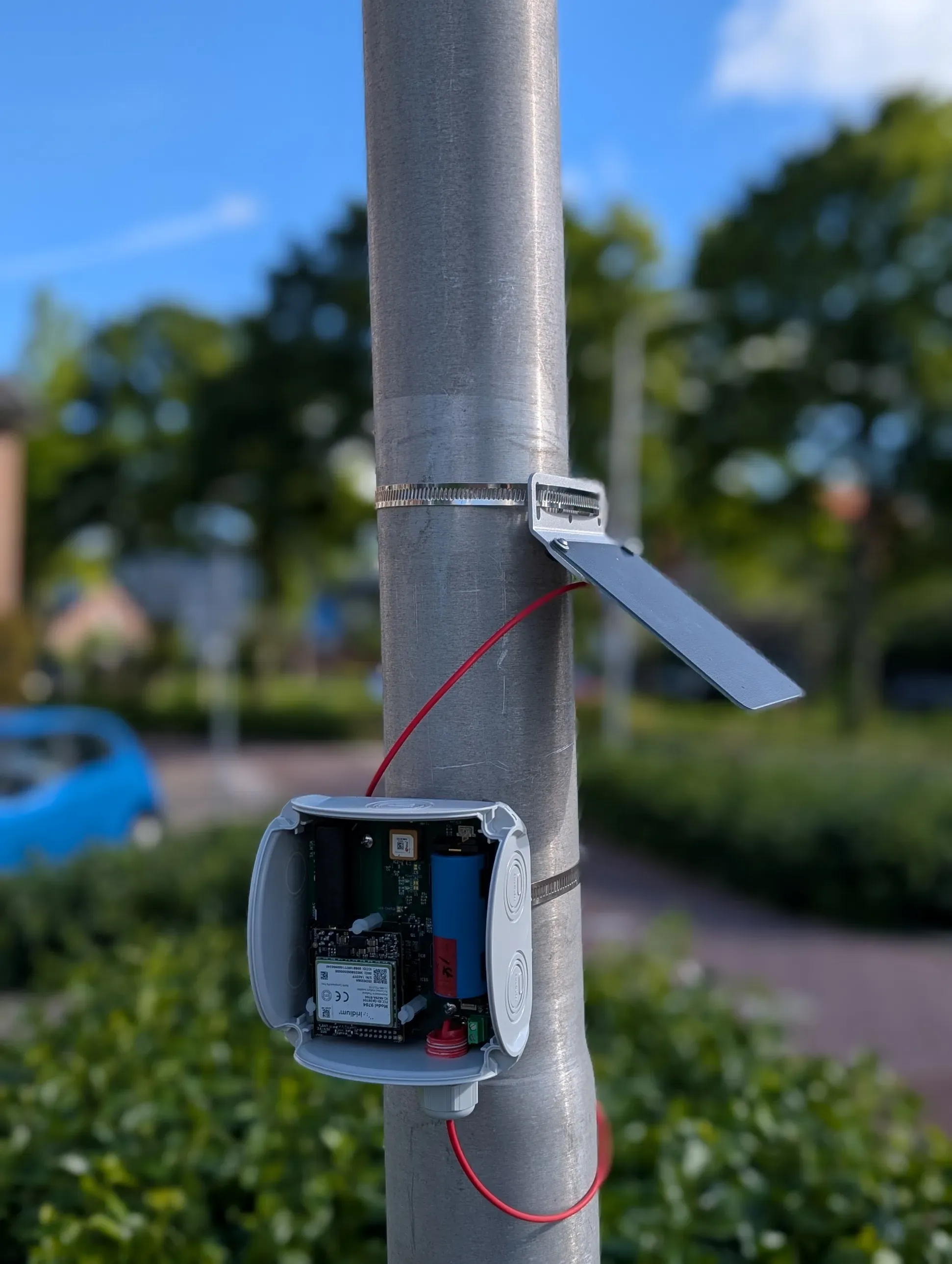
The result: the unit on its bracket, clamped on a pole, with the solar panel above it.
Photo: TAHMO WLM assembly manual.What is in the kit
Section titled “What is in the kit”
Everything laid out. From the left: the WLM board, the RockBLOCK Iridium modem with its antenna, the battery cell, plastic spacers and screws, the two enclosure halves with the cable gland, the stainless-steel bracket and hose clamps, the solar panel with its cable and bracket, and a bag of bolts, washers and nuts.
Photo: TAHMO WLM assembly manual.Besides the kit you need:
- a drill with a 6 mm and a 3.5 mm bit;
- a screwdriver and a spanner for the bolts;
- a soldering iron and solder (not needed if you use the screw terminal for the solar cable);
- insulating tape;
- a data-capable USB-C cable.
Prepare the enclosure
Section titled “Prepare the enclosure”-
Remove one knockout. Punch out one of the two round knockouts on the side of the enclosure. This is where the solar-panel cable will enter through the cable gland.

One knockout removed.
Photo: TAHMO WLM assembly manual. -
Drill the holes in the base. Drill the two holes marked in green with the 6 mm bit, and bore out the holes marked in red to 3.5 mm.

Green: 6 mm. Red: 3.5 mm.
Photo: TAHMO WLM assembly manual.
Drilling the base. Clamp or hold the enclosure firmly and remove the swarf afterwards.
Photo: TAHMO WLM assembly manual. -
Screw the spacers in. Fit the spacers that will carry the board.

Spacers fitted.
Photo: TAHMO WLM assembly manual. -
Mount the bracket on the back of the enclosure with two bolts, washers and nuts.

Bolts seen from inside the enclosure.
Photo: TAHMO WLM assembly manual.
The bracket fitted on the back.
Photo: TAHMO WLM assembly manual. -
Insert the plugs supplied in the kit so that the enclosure is watertight.

Plugs inserted.
Photo: TAHMO WLM assembly manual.
Prepare the board
Section titled “Prepare the board”-
Fit the plastic spacers on the board, loosely: you must still be able to wiggle them.

Board, top side.
Photo: TAHMO WLM assembly manual.
Board, underside.
Photo: TAHMO WLM assembly manual.
A plastic spacer: loose now, tightened in the next step.
Photo: TAHMO WLM assembly manual. -
Mount the RockBLOCK (the Iridium modem) on its connector on the board, then tighten the spacers.

RockBLOCK mounted and held by the spacers.
Photo: TAHMO WLM assembly manual. -
Connect the solar-panel cable. Solder the extension cable to the board. Alternative: clamp it in the screw terminal.

The red solar cable on the board.
Photo: TAHMO WLM assembly manual.
Optional: charging over USB
Section titled “Optional: charging over USB”To charge the battery over USB, connect the pads marked USB Charge on the board with a drop of solder. The board then draws up to 500 mA from any USB port. Without the solder bridge, USB carries data only. There is no LED that shows USB charging.

The USB Charge pads (arrow).
Photo: TAHMO WLM assembly manual.Close the unit
Section titled “Close the unit”-
Mount the board in the enclosure with two bolts.

Board mounted; the cable leaves through the knockout.
Photo: TAHMO WLM assembly manual. -
Fit the cable gland. Wrap a little tape around the thread of the gland so that it grips in the enclosure, pull the cable through it, and screw the gland into the enclosure.

Tape on the gland thread.
Photo: TAHMO WLM assembly manual.
Gland fitted, cable through.
Photo: TAHMO WLM assembly manual. -
Seal the cable. Wrap a little tape around the cable where it passes through the gland, to increase its diameter, then tighten the gland.

The cable leaving the gland.
Photo: TAHMO WLM assembly manual.
Gland tightened.
Photo: TAHMO WLM assembly manual. -
Screw on the antenna and fit the battery.

Antenna on, battery in its holder.
Photo: TAHMO WLM assembly manual. -
Close the lid and tighten the screws evenly, so that the gasket seals all around.

Lid closed.
Photo: TAHMO WLM assembly manual.
Assemble the solar panel
Section titled “Assemble the solar panel”The solar panel is a 5 V panel; the board limits the charging current to 500 mA.
-
Drill the two mounting holes (3.5 mm) as shown, unless your panel already has them.

Rear of the panel.
Photo: TAHMO WLM assembly manual. -
Fit the bracket with bolts and nuts. The orientation of the bracket depends on how the panel will be mounted: the panel must face the sun (south in the northern hemisphere, north in the southern one).

Bracket fitted.
Photo: TAHMO WLM assembly manual.
Install reflexa micro on the board
Section titled “Install reflexa micro on the board”Boards come with TAHMO’s own firmware. The unit becomes a reflexa micro unit when the reflexa micro firmware is installed: follow First installation on a TAHMO WLM board. Then take the unit to the site: Install on site.